


By Sean Tinney November 18, 2025
You’ve already created the content. Your blog posts contain insights, strategies, and information your audience values. The question isn’t whether to share that content with your email list—it’s how to do it without rewriting everything from scratch.
Your blog content represents hours of research, writing, and editing. Why let it reach only the portion of your audience who happens to find it through search or social media?
Email subscribers are YOUR audience. You control when they see your message, unlike social platforms where algorithms decide what gets shown. When you repurpose blog content for email, you’re giving your best work a second life where it can drive more traffic, engagement, and conversions.
The Manual Approach: What Most People Do Wrong
Before we talk about the fastest way to repurpose blog content, let’s look at why most people struggle with this. The typical approach goes like this:
- Copy your entire blog post into an email
- Send it hoping people will read 2,000+ words in their inbox
- Wonder why open rates are terrible and nobody’s clicking
The problem isn’t the content itself—it’s that blog posts and emails serve different purposes. Blog posts are designed for deep reading on a screen where someone has already committed to learning about your topic. Emails compete with dozens of other messages in an inbox where attention spans are measured in seconds.
Effective blog-to-email repurposing requires two key adjustments:
Extract the hook: Your email needs a compelling reason to click through to the full post. What’s the single most valuable takeaway or surprising insight? That becomes your email focus—not a comprehensive summary of everything in the post.
Adapt for scanning: Email readers scan more than they read. Your repurposed content needs shorter paragraphs, clearer benefits, and a more conversational tone than your original blog post. Strip out the SEO-optimized sections that don’t add value for someone reading in their inbox.
This manual process works, but it takes time. For each blog post you want to repurpose, you’re looking at 30 minutes minimum of rewriting, reformatting, and editing. If you publish multiple posts per week, that time adds up quickly.
Turn Blog Posts Into Emails in Under 2 Minutes
This manual repurposing process works, but it’s time-consuming. AWeber’s AI Writing Assistant eliminates that friction by converting any blog URL into email-ready copy automatically – no rewriting, no reformatting, just paste and customize.
The AI reads your entire blog post, identifies the core message, and generates a concise email summary that maintains your voice. What normally takes over 30 minutes happens in under 2 minutes.
Here’s how it works:
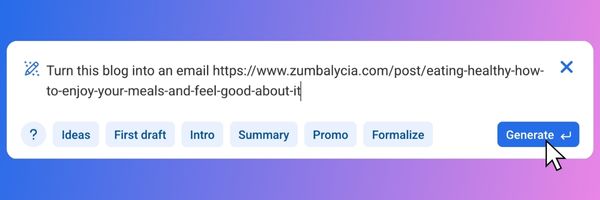
Step 1: Paste Your Blog URL
Open any message in AWeber and type “/” (forward slash) to open the AI Writing Assistant.
Copy the URL of the blog post you want to repurpose. Paste it into the AI prompt field. You can add context like “Turn this blog post into an email summary” or simply paste the URL—the AI understands what to do.
Step 2: Review the Generated Summary
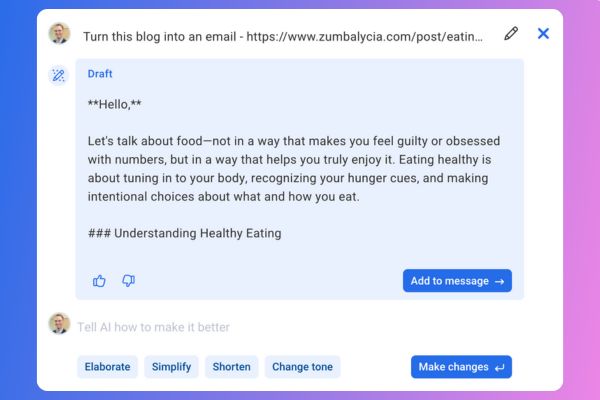
The AI analyzes your blog and creates an email-ready summary in approximately 15 seconds. The generated content captures your main points in 150-300 words, formatted for easy scanning in an inbox.
Step 3: Edit and Send
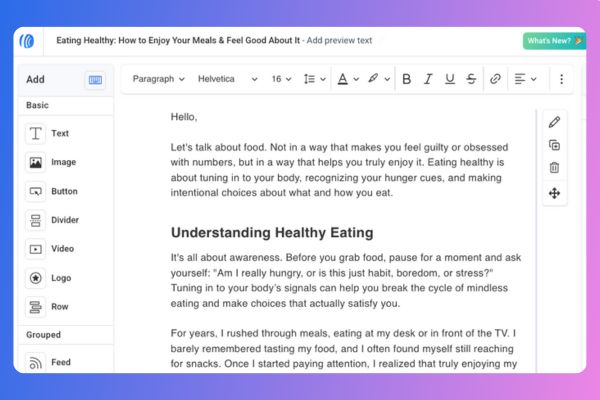
Adjust the tone if needed (more casual, more professional, more urgent), personalize the opening or closing, and customize your call-to-action. Add your subject line using the AI Subject Line Assistant, then send or schedule your message.
What the AI Does Behind the Scenes
When you paste a blog URL, AI Writing Assistant:
- Reads the entire blog post – It analyzes your content structure, main points, and key takeaways
- Identifies the core message – It determines what matters most to your readers
- Condenses without losing meaning – It creates a summary that captures your blog’s value in 150-300 words
- Maintains your voice – It matches the tone and style of your original writing
- Formats for email – It structures the content for easy scanning with clear paragraphs and natural flow
The AI doesn’t just extract sentences randomly – it understands context and creates cohesive email copy that reads naturally.
Using Blog Content in Different Ways
Single post summary: Paste one blog URL to create a dedicated email about that topic.
Newsletter roundups: Paste multiple blog URLs separately, generate summaries for each, then combine them into one newsletter highlighting your recent content.
Automated sequences: Use summaries in welcome workflows to introduce new subscribers to your best content.
Beyond Blog Posts: Other Content You Can Repurpose
AI Writing Assistant works with any URL, not just blog posts. Use it to repurpose:
- Social media posts – Turn popular Twitter threads or LinkedIn posts into email content
- Product pages – Create email announcements from new product launches
- Landing pages – Summarize webinar or event pages for email promotion
- News articles – Share relevant industry news with your commentary
- Video descriptions – Convert YouTube video descriptions into email summaries
The same process works for any web content—paste the URL, generate the summary, customize, and send.
AI Subject Line Assistant generates multiple subject line options based on your message content. After creating your email from a blog post, click “Get Suggestions” in the subject line field to see 5+ AI-generated options optimized for mobile length and engagement.
Newsletter Assistant learns your writing style from your website and past emails, then automatically drafts weekly newsletters without requiring prompts. It proactively creates newsletter content that you can review, edit, and send.
Workflow Automation delivers your blog content automatically when subscribers join specific segments. Create a workflow that sends your top blog posts to new subscribers over their first 30 days.
Try It This Week
Pick one blog post you’ve published recently. Open a new message in AWeber and paste your blog URL in the AI Writing Assistant. See how quickly the AI converts your content into email-ready copy.
Compare the 2 minutes you spend generating and customizing the summary to the 30+ minutes you’d typically spend rewriting your blog content from scratch.
